
In-memory vs remote cookbook
When to use this
You want the same Graft code to run locally in-process during development and against a remote Gateway in production — or switch after Quick Start tutorial #6.
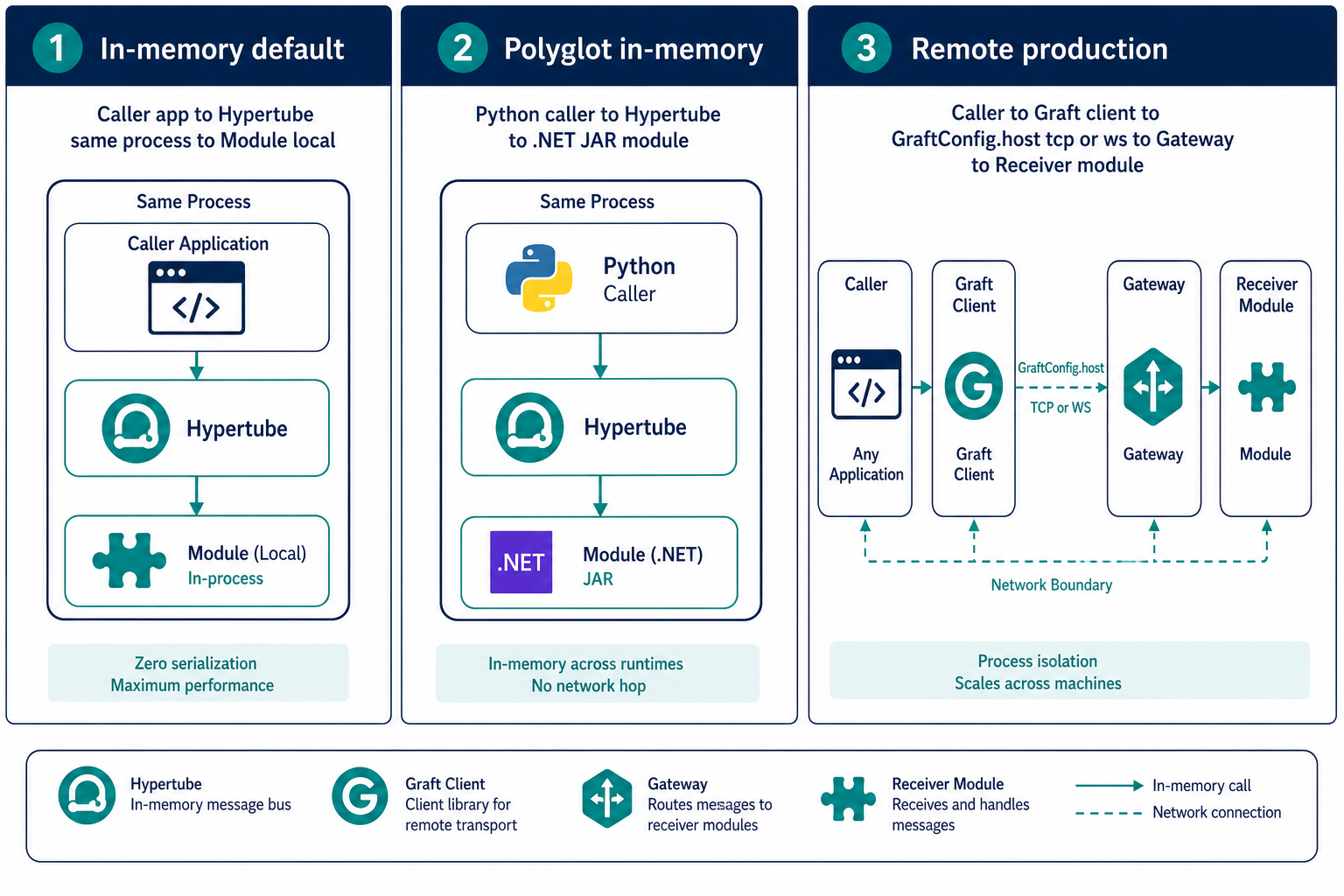
Core idea: execution location is not a programming concern. The same Graft, methods, types, and error handling apply whether Hypertube runs in-memory, across local runtimes in one process, or on a remote node — only GraftConfig changes.
| Mode | When to use |
|---|---|
| In-memory | Dev, modular monoliths, zero network overhead |
| Local polyglot | Multiple runtimes (.NET + Python) in one process |
| Remote | Production microservices, separate GG hosts |
Prerequisites
- GraftConfig reference
- Remote GG running when testing remote mode
In-memory (default)
Do not set host. Hypertube executes calls in the same process.
import { OrderService } from "@graft/nuget-Orders";
// GraftConfig.host unset → in-memory
const orders = new OrderService();
await orders.createOrder({ id: "1" });
Ensure the receiver runtime/module is loaded in the same process (typically same GG or embedded Hypertube host).
Remote via code
import { GraftConfig, OrderService } from "@graft/nuget-Orders";

GraftConfig.host = "tcp://order-service:8990";
const orders = new OrderService();
await orders.createOrder({ id: "1" });
GraftConfig.host = "ws://order-service:8888/ws";
var orders = new OrderService();
orders.CreateOrder(new { Id = "1" });
Remote via config file (no code change)
graftcode-config.json next to your app:
{
  "host": "tcp://order-service:8990"
}
Or per-Graft file @graft-nuget-Orders-config.json:
{
  "host": "tcp://order-service:8990"
}
Remote via environment variable
Set a global or runtime-specific env var (exact name depends on generated Graft; check generated GraftConfig or use graftcode-config pattern). Config files and env vars override code.
Dev vs prod pattern
| Environment | Configuration |
|---|---|
| Local dev | No host — in-memory |
| Staging | graftcode-config.json with staging GG URL |
| Production | Env var or secrets-mounted config with prod GG URL |
Same binary artifact in all environments.
Verify it works
- In-memory: stop remote GG — calls still work if module is local
- Remote: stop GG — calls fail with connection error; restart GG — calls succeed
Use GG_DEBUG=1 on Gateway for wire-level traces — Debugging runbook.
Common mistakes
| Mistake | Fix |
|---|---|
host set but wrong port | Match GG --tcpPort / --port; see Transport guide |
| Expecting remote without GG running | Start GG on target host |
| Config file ignored | Check precedence — env may override file |
See also
Practiced in Quick Start tutorial #6