
Edge client authentication
When to use this
A frontend or edge app calls backend logic through a Graft and must send JWT, API keys, or session tokens.
Prerequisites
- Install a Graft
- Edge clients without APIs (concept)
Alpha vs plugin model
| Approach | Status | Description |
|---|---|---|
| Pass token as method parameter | Alpha (supported now) | Explicit parameter on each public method; validate in your code |
| Security plugins (JWT send/receive) | Roadmap / sample code | Automatic attach/validate via Hypertube plugins — see Security plugins |
Graftcode Context (--useContext) | Available | HTTP headers available to hosted code when using context-aware hosting |
Always check Alpha limitations for current auth support.
For the full security layer model, see Authentication and authorization (diagram below).
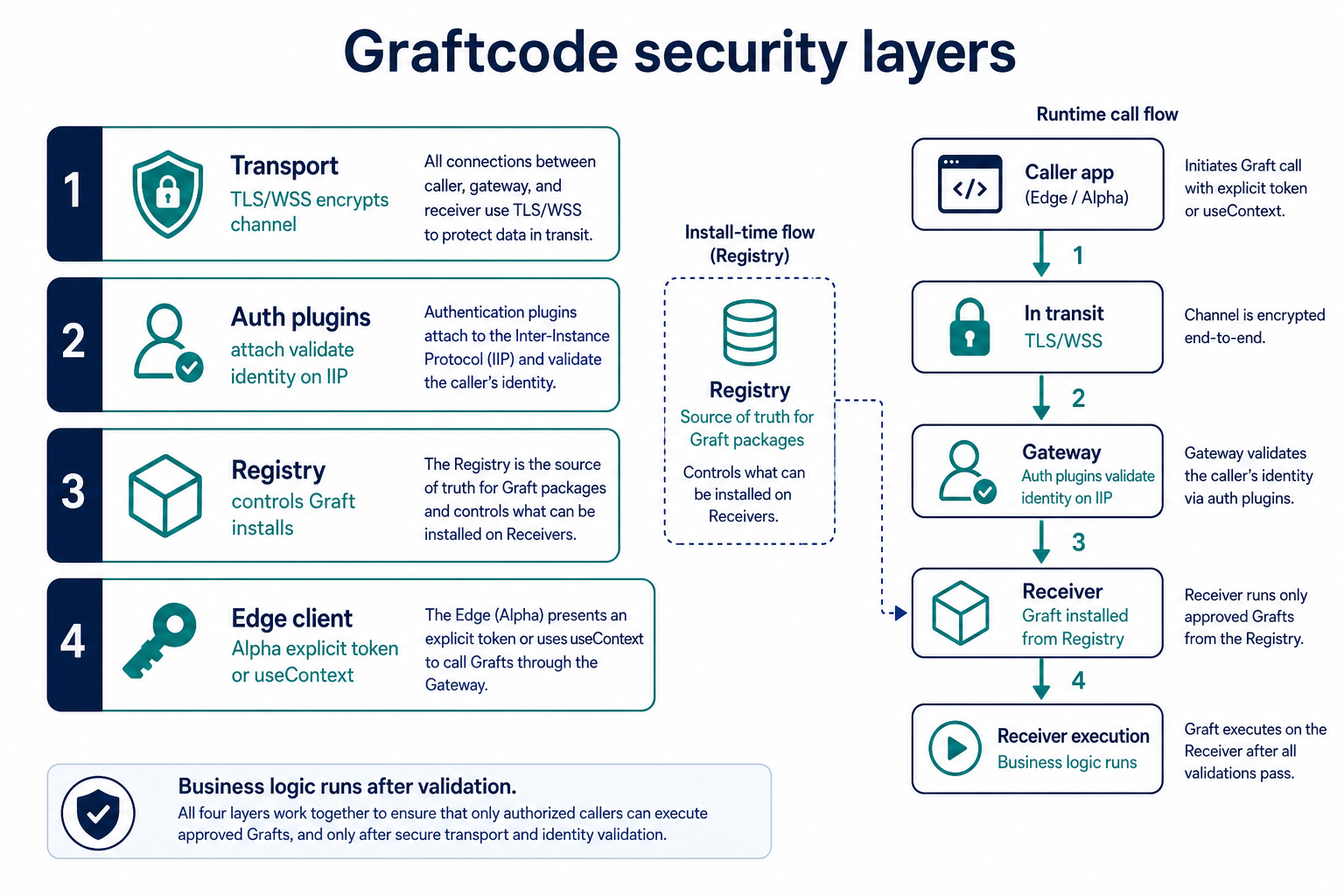
Alpha pattern: explicit token parameter
Backend (C#):
public static class AccountFacade
{
    public static ProfileDto GetProfile(string jwtToken)
    {
        ValidateJwt(jwtToken); // your logic
        return LoadProfile();
    }

    private static void ValidateJwt(string token)
    {
        if (string.IsNullOrEmpty(token))
            throw new UnauthorizedAccessException("Missing token");
        // decode and validate...
    }
}
Edge client (TypeScript):
import { AccountFacade } from "@graft/nuget-Account";

const token = await getAccessToken(); // from your auth provider
const profile = await AccountFacade.getProfile(token);
Security boundary remains at the Gateway + your validation code — not in Graftcode magic defaults.
Gateway: enable context (headers → code)
When hosting on GG with --useContext, request context (including headers) can reach hosted code for custom auth extraction:
./gg ./MyLib.dll --useContext --port 8888 --httpPort 8889
Combine with your own middleware-style logic inside the hosted module.
Plugin pattern (when enabled)
Caller-side plugin attaches JWT before IIP send; receiver-side plugin validates before method execution. Sample C# in Security plugins.
Do not assume plugins work in Alpha production without verifying your release notes.
Transport security
Use WSS and TLS for token-bearing traffic in production — Transport security TLS/WSS.
Verify it works
- Missing token → your validation throws; no business logic runs
- Valid token → method returns data
- Invalid token → rejected before side effects
Common mistakes
| Mistake | Fix |
|---|---|
| Assuming automatic JWT propagation in Alpha | Pass token explicitly |
| Tokens in logs | Never log full JWTs |
| HTTP without TLS in production | Use WSS / HTTPS |
See also
Practiced in Quick Start tutorial #1