
MCP expose tools
When to use this
You want AI agents to call your business logic through the Model Context Protocol (MCP) without writing a separate API layer.
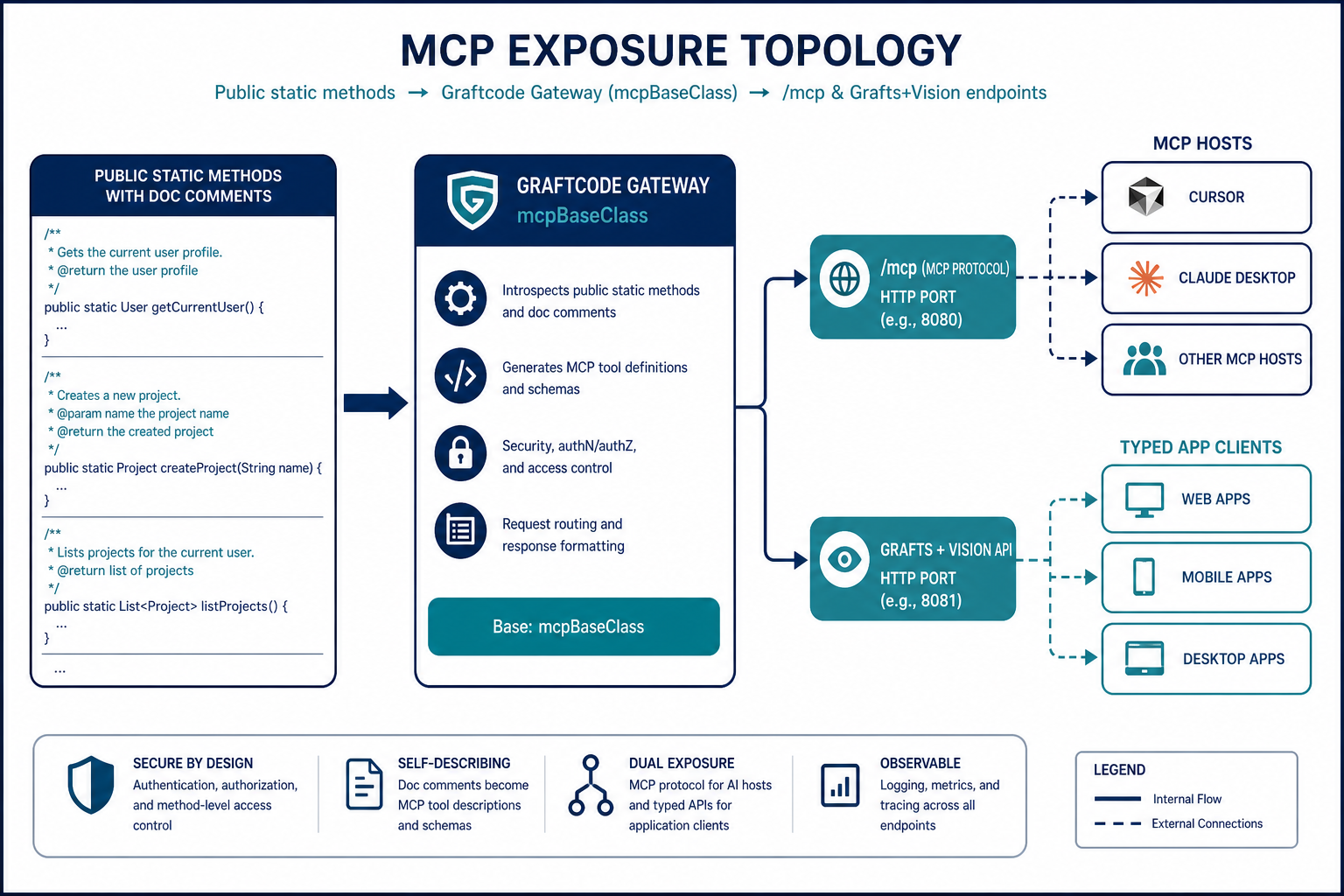
MCP is a protocol, not a programming model: stateless JSON-RPC tool calls only — no object lifetimes, callbacks, or rich sessions. Graftcode projects existing static methods as MCP tools via Gateway configuration. The same facade can serve Grafts, edge clients, and AI tools. Method comments become MCP tool descriptions. Stateful workflows stay on Grafts, not MCP.
Hands-on: Quick Start #5
Prerequisites
- Public static methods on an exposed class (MCP is stateless request–response)
- Ports and CORS configured for browser-based MCP clients
Steps
1. Design an MCP-friendly facade
Use a class with public static methods and XML/doc comments (they become tool descriptions):
public static class AiToolsFacade
{
    /// <summary>Returns the current price for a region code.</summary>
    public static decimal GetPrice(string region) => /* ... */;
}
2. Start GG with MCP base class
./gg ./MyLib.dll \
  --types MyCompany.AiToolsFacade \
  --mcpBaseClass MyCompany.AiToolsFacade \
  --port 8888 \
  --httpPort 8889 \
  --corsConfig ./cors.config
--mcpBaseClass is the fully qualified type name used when tools/call receives a bare method name without params.class.
3. MCP HTTP endpoints
Served on the HTTP port (--httpPort):
| Endpoint | Method | Purpose |
|---|---|---|
/mcp | GET, POST, DELETE, OPTIONS | MCP JSON-RPC session |
/mcpmodel | GET | MCP tool schema from UGM |
/mcpport | GET | Returns WebSocket port (same as --port) for MCP clients |
Example:
curl http://localhost:8889/mcpport
curl http://localhost:8889/mcpmodel
WebSocket MCP traffic uses --port (default 80; use 8888 in dev).
5. Connect an MCP client
On the Vision Installation tab, open Connect and select MCP. Vision generates the client configuration for your Gateway:
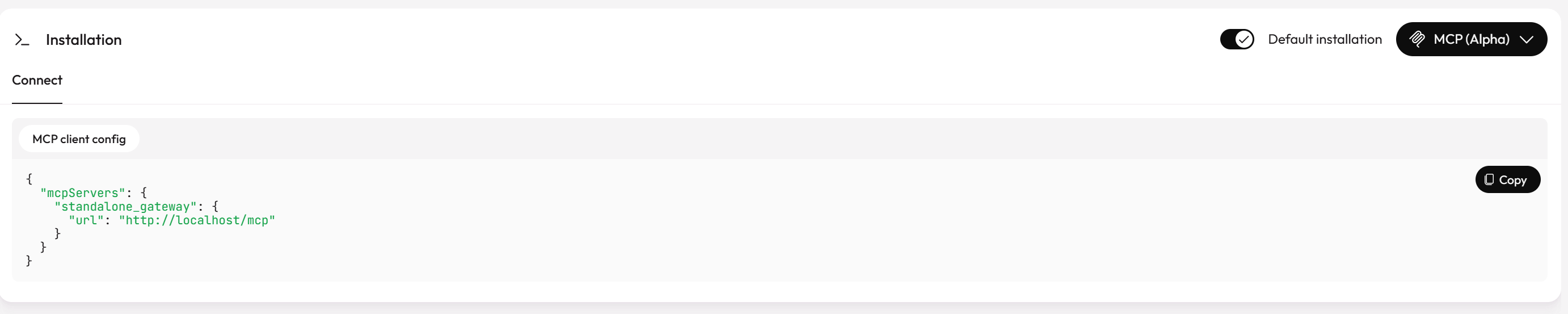
Copy this JSON into your MCP host — for example Cursor's MCP settings or .cursor/mcp.json. Adjust the URL if your Gateway uses a non-default HTTP port (e.g. http://localhost:81/mcp).
For Cursor, you can also add the server under Settings → Tools & MCP. Claude Desktop may require mcp-remote for HTTP endpoints — see Quick Start #5.
6. CORS for MCP clients
Include MCP headers in CORS config:
allowedOrigins=http://localhost:3000
allowedHeaders=content-type,authorization,MCP-Protocol-Version,Mcp-Session-Id
exposedHeaders=Mcp-Session-Id,MCP-Protocol-Version
Verify it works
/mcpmodelreturns tool definitions matching your static methods- MCP client lists tools and successfully calls
GetPrice - Method comments appear as tool descriptions
Common mistakes
| Mistake | Fix |
|---|---|
| Instance methods only | MCP exposes static methods; add a static facade |
| CORS blocks browser MCP | Add MCP headers to --corsConfig |
Wrong --mcpBaseClass FQN | Must match UGM type name exactly |
| Stateful workflows via MCP | Use Grafts for stateful; MCP stays stateless |
See also
Practiced in Quick Start tutorial #5