
Project Key and Registry URL
When to use this
You need to bind GG to a Graftcode project, install Grafts from a stable registry in CI/CD, or understand the difference between the Project Key (credential) and the Registry URL (package feed).
Prerequisites
- Optional: Graftcode Portal account for project-bound mode
- Installed GG
Concepts
| Term | What it is |
|---|---|
| Project Key | JWT token from the Portal — authenticates GG and cloud upload |
Project ID (pid) | Stable ID inside the JWT — never changes for your project |
| Registry URL | Package-manager feed where Grafts are installed from |
| Registry suffix | graftcode (with Project Key) or free (anonymous local mode) |
Registry URL patterns
With Project Key:
http://grft.dev/{projectId}__graftcode
Without Project Key (anonymous / standalone):
http://grft.dev/{auto-generated-guid}__free
The dashboard shows the registry address for your project. The Project Key is secret — treat it like a password. The Registry URL is shared in package.json, CI configs, and install commands.
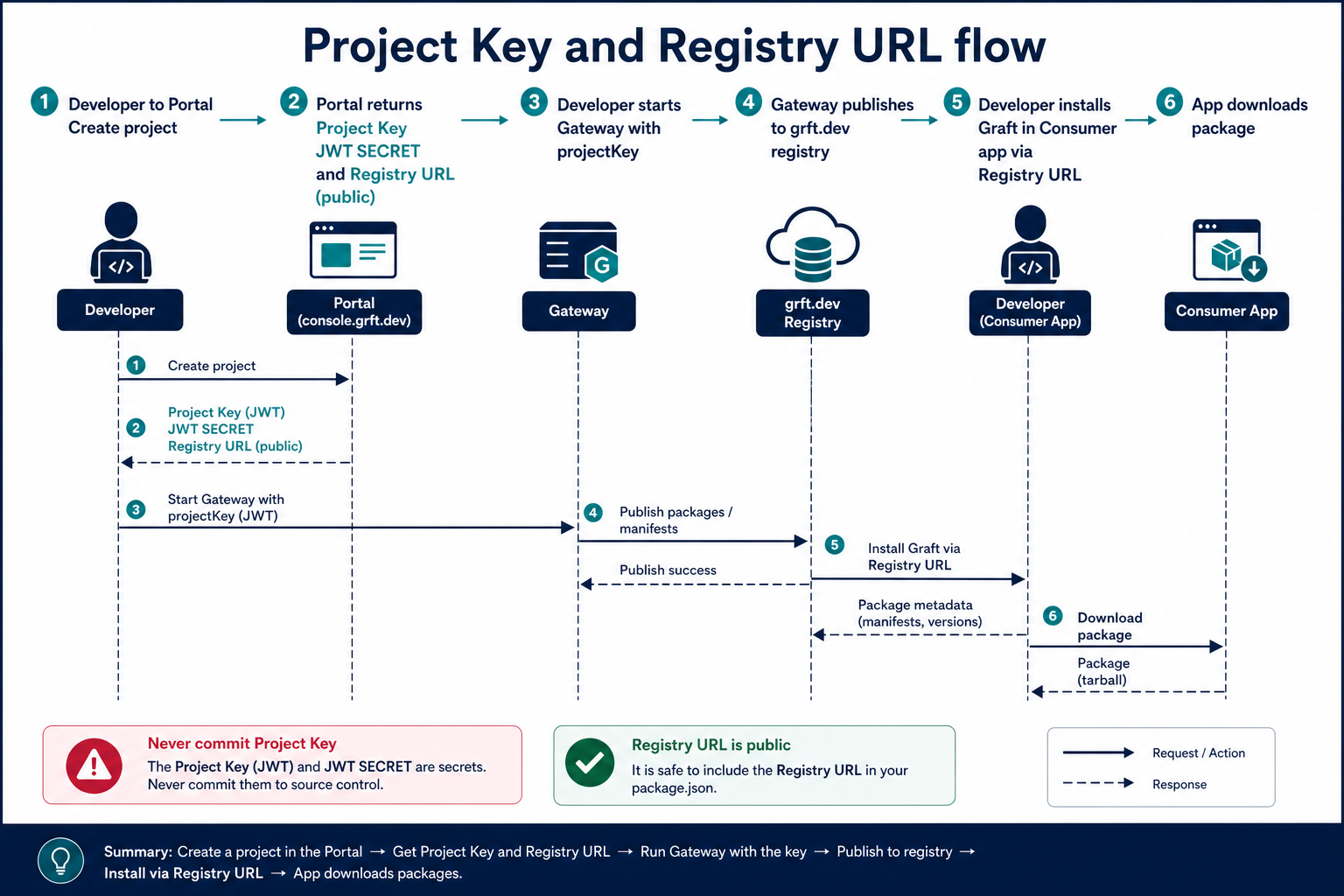
The Project Key is a credential for Gateway and cloud upload. The Registry URL is the public package feed for installs.
Steps
1. Get a Project Key
- Sign in to portal.graftcode.com
- Create a workspace and project (or open an existing project)
- Copy the Project Key from project settings or the Gateway wizard
2. Configure GG
export GC_PROJECT_KEY="<your-jwt>"
./gg ./MyLib.dll --projectKey "$GC_PROJECT_KEY" --port 8888 --httpPort 8889
Or pass directly:
./gg ./MyLib.dll --projectKey "eyJ..." --port 8888
GC_PROJECT_KEY overrides --projectKey when set.
3. Install Grafts using the registry URL
From Graftcode Vision or the Portal dashboard, copy the install command:
npm install @graft/nuget-MyModule --registry=http://grft.dev/abc123-project-id__graftcode
dotnet add package graft.nuget.MyModule --source http://grft.dev/abc123-project-id__graftcode
4. Local development without Portal
Run GG without --projectKey. GG generates an anonymous project ID and uses the __free registry suffix. Suitable for local try-out; not stable across GG restarts for CI.
Verify it works
- GG starts without JWT errors
- Vision shows install commands with your project's registry URL
npm/dotnetinstall succeeds using that registry
Query registry info from a running GG (HTTP/WebSocket endpoints):
/registry— registry name/projectId— current project id
Common mistakes
| Mistake | Fix |
|---|---|
| Confusing Project Key with Registry URL | Key = JWT credential; URL = feed for package managers |
| Registry URL changes every restart (free mode) | Use Project Key for stable {id}__graftcode feed |
| Key leaked in git | Use GC_PROJECT_KEY env var in CI secrets |