
Ports, protocols, and CORS
When to use this
You need to change default ports, enable additional transports, or allow browser/MCP clients to call GG from another origin.
Prerequisites
Default ports
| Server | Flag to enable | Port flag | Default |
|---|---|---|---|
| WebSocket | (always on) | --port | 80 |
| HTTP (Vision, MCP HTTP) | (always on) | --httpPort | 81 |
| TCP | --tcpServer | --tcpPort | 82 |
| HTTP/2 | --http2Server | --http2Port | 83 |
WebSocket is the default transport for browser edge clients (ws://host:port). TCP is typical for service-to-service backend calls (tcp://host:port).
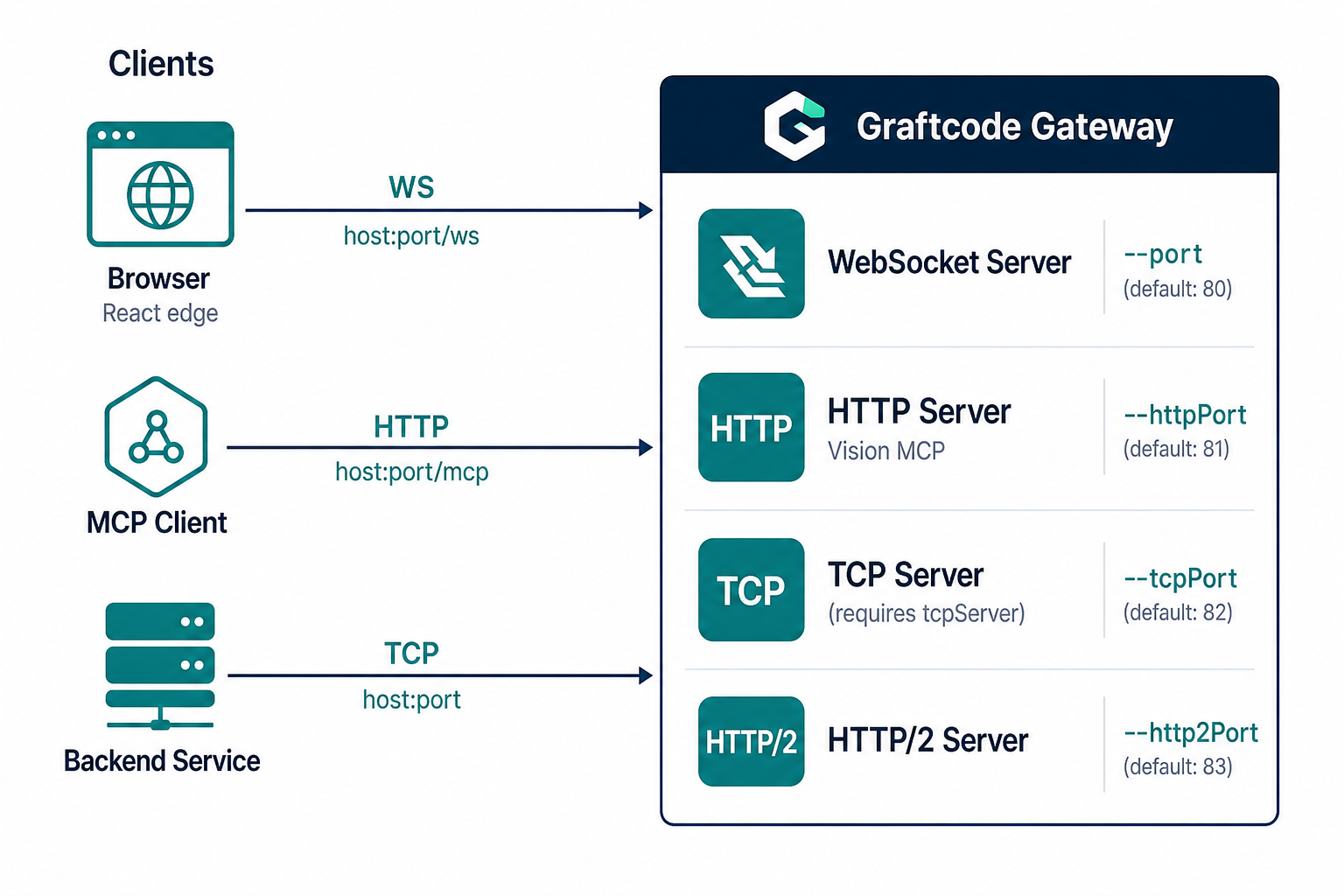
Customize ports
Avoid privileged port 80 in development:
./gg ./MyLib.dll --port 8888 --httpPort 8889
Enable TCP for backend callers:
./gg ./MyLib.dll --port 8888 --httpPort 8889 --tcpServer --tcpPort 8990
On the consumer side, set GraftConfig.host accordingly — see Transport selection.
CORS
For browser-based clients and MCP over HTTP, configure CORS.
CLI
./gg ./MyLib.dll --httpPort 8889 --corsAllowedOrigins "http://localhost:3000,https://app.example.com"
Use * to allow any origin (not recommended with credentials).
Config file (--corsConfig)
allowedOrigins=http://localhost:3000,https://app.example.com
allowedMethods=GET,POST,PUT,PATCH,DELETE,OPTIONS
allowedHeaders=content-type,authorization,MCP-Protocol-Version,Mcp-Session-Id
exposedHeaders=Mcp-Session-Id,MCP-Protocol-Version
allowCredentials=false
./gg ./MyLib.dll --httpPort 8889 --corsConfig ./cors.config
When both --corsAllowedOrigins and --corsConfig are set, the config file is applied at startup and can override CLI defaults.
Verify it works
# Vision on custom HTTP port
curl -I http://localhost:8889/vision

# MCP port discovery
curl http://localhost:8889/mcpport
Common mistakes
| Mistake | Fix |
|---|---|
| Port 80 blocked or requires root | Use high ports (8888+) |
| Web app and GG both on port 80 | Separate --port / --httpPort from your app |
| MCP from browser blocked | Add MCP headers to allowedHeaders in CORS config |
| TCP connection refused | Add --tcpServer; set consumer host=tcp://... |